One Tumbler Design, Three Machines: We Ran the Numbers and the Result Surprised Us
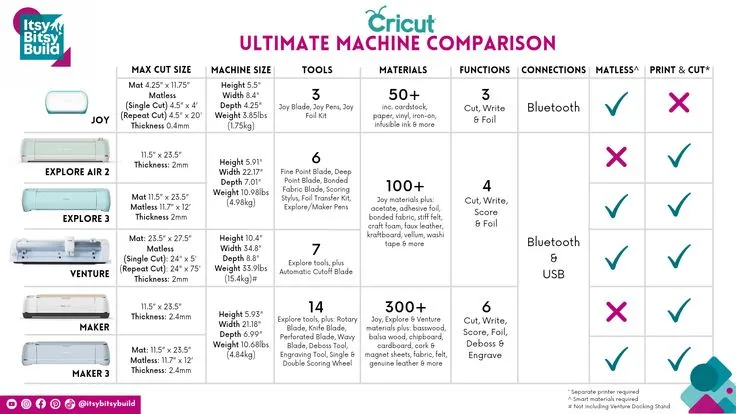
Photo: three Cricut cutting machines side by side comparison craft table, via i.pinimg.com
Every few months, the same question shows up in every Cricut Facebook group and subreddit: "Should I upgrade?" And every time, the answers are the same. Half the people say the Maker changed their life. The other half say their Explore does everything they need.
We got tired of vibes-based advice, so we ran an experiment. One design, three machines, identical materials — and a spreadsheet. Here's what happened.
The Setup: Same Design, Same Rules
The project: a personalized 20oz tumbler set with a monogram decal and a small accent design. One of the most popular, reliably sellable products a Cricut maker can produce. We cut the identical Design Space file on a Cricut Explore 3, a Cricut Maker 3, and a Cricut Joy, using the same brand of permanent vinyl and the same transfer tape.
We tracked four things: total hands-on time, machine time, material waste (measured by weighing leftover vinyl), and total cost per finished unit.
The Results, Machine by Machine
Cricut Explore 3: Total time came in around 24 minutes per tumbler set. The Explore handled the design without complaint, and material waste was our baseline — call it 100%. Cost per unit, including the blank tumbler, ran about $4.10.
Cricut Maker 3: Here's where it gets interesting. The Maker cut the same file roughly 15% faster thanks to its more powerful motor and adaptive tool system. But material waste? Identical. The design doesn't get more efficient just because the machine is stronger. Cost per unit: $4.10, plus a machine that costs several hundred dollars more.
Cricut Joy: The little machine that could — with a catch. Because the Joy only takes mats up to 4.5 inches wide, we had to slice the design into pieces and cut in two passes. Hands-on time jumped to nearly 40 minutes. Waste climbed about 20% because of the awkward material nesting. Cost per unit: $4.65. It worked, but it worked harder.
The Uncomfortable Truth About the Upgrade Question
Look at those numbers again. The Maker — the machine everyone covets — produced the exact same $4.10 tumbler as the Explore. It just did it a few minutes faster.
That's the finding that matters: for the vast majority of vinyl, HTV, and cardstock work, machine choice barely moves your cost per unit. Workflow moves your cost per unit. Weeding technique, mat condition, file optimization, and batching strategy all swing your numbers far more than cutting speed does. A maker with a messy workflow on a Maker 3 will lose to a maker with a tight workflow on a two-year-old Explore every single time.
So When Does Upgrading Actually Pay Off?
There are three situations where a machine upgrade is a genuine business decision, not shiny-object syndrome:
1. Your materials have outgrown your machine. If you want to cut basswood, chipboard, or fabric with precision, the Maker's tool ecosystem is a real requirement, not a luxury.
2. Your volume has outgrown your time. If you're producing 100+ units a month and every saved minute compounds, speed becomes money. A 15% faster cut is real when you're cutting all weekend.
3. Your product line demands it. Expanding into stencil cutting at scale, longer cuts, or smart-material workflows can justify the jump.
If none of those apply? Your machine is not your bottleneck. Invest that upgrade money in better blanks, a second mat, a photo light box, or — honestly — just more material to practice with.
The Decision Framework
Ask yourself three questions:
- Is there a specific material or product I literally cannot make with my current machine? (Not "would be nicer" — cannot.)
- Am I turning down orders or losing weekends to production volume?
- Have I actually optimized my current workflow, or am I hoping a new machine will fix a process problem?
Two or more yeses? Upgrade guilt-free. One or fewer? Close the tab. Your current machine, plus a sharpened workflow, will out-earn a new machine plus the same old habits every time.
The tumbler came out great on all three machines, by the way. Customers can't tell which one cut it. Your bank account can tell which one you bought.